
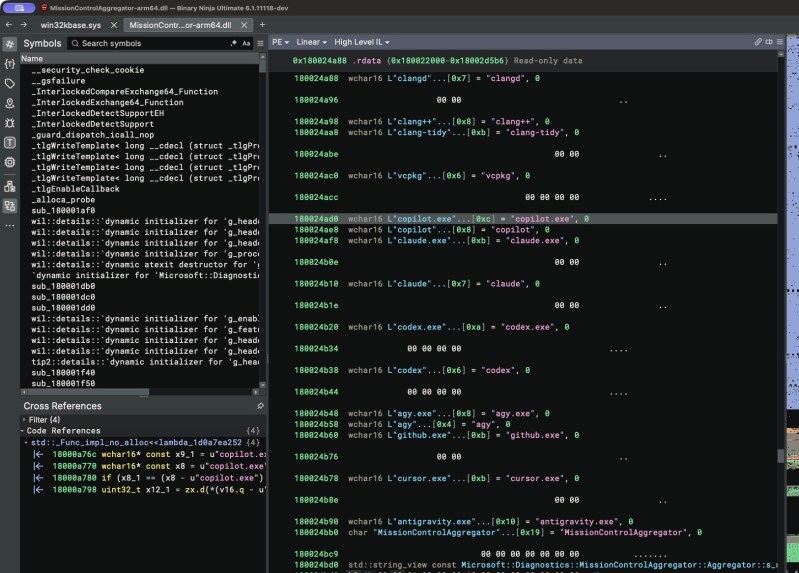
File this one under “shocked, but not that shocked”– hacker [Xusheng Li] did some digging on a recent Windows 11 build and found that it seems to be phoning home with details about not only what AI agents you might be using on your system, but what dev tools are in use too. The full writeup is worth reading before rushing to judgement on this, but no doubt Microsoft has your best interests at heart– they always do, right?
The saga starts with a library called MissionControlAggregator.dll, which contains a list of executable files to look for– things like codex.exe on the agent front, but also dev tools as common as python.exe or gcc.exe–which would be innocent enough, and perhaps even helpful if the OS was watching for these files to do something locally. It might be doing something locally, but [Xusheng] was able to trace the diagnostic that triggers when you launch one of the apps it is listening for, and yes, at least on a default Windows 11 install, it phones home about it. Alas, WSL won’t save you this time, as the same event is apparently generated when you launch the linux version in said subsystem.
Of course the default Windows 11 install does have “optional diagnostics” enabled by default, so you could argue that this is something that the system administrator consented to– provided they knew about it, which they likely don’t. We certainly had no idea that this was part of those “optional diagnostics” and are thankful to [Xusheng] for the tip.
Our own [Jenny List] took Windows 11 for a drive back in June, and emerged rather unimpressed. Your mileage may vary, but if you are, like the majority of the world’s desktop users, on Windows, you might want to double-check those privacy settings.


